WinBoat's Helios vGPU: What It Is (And Isn't)
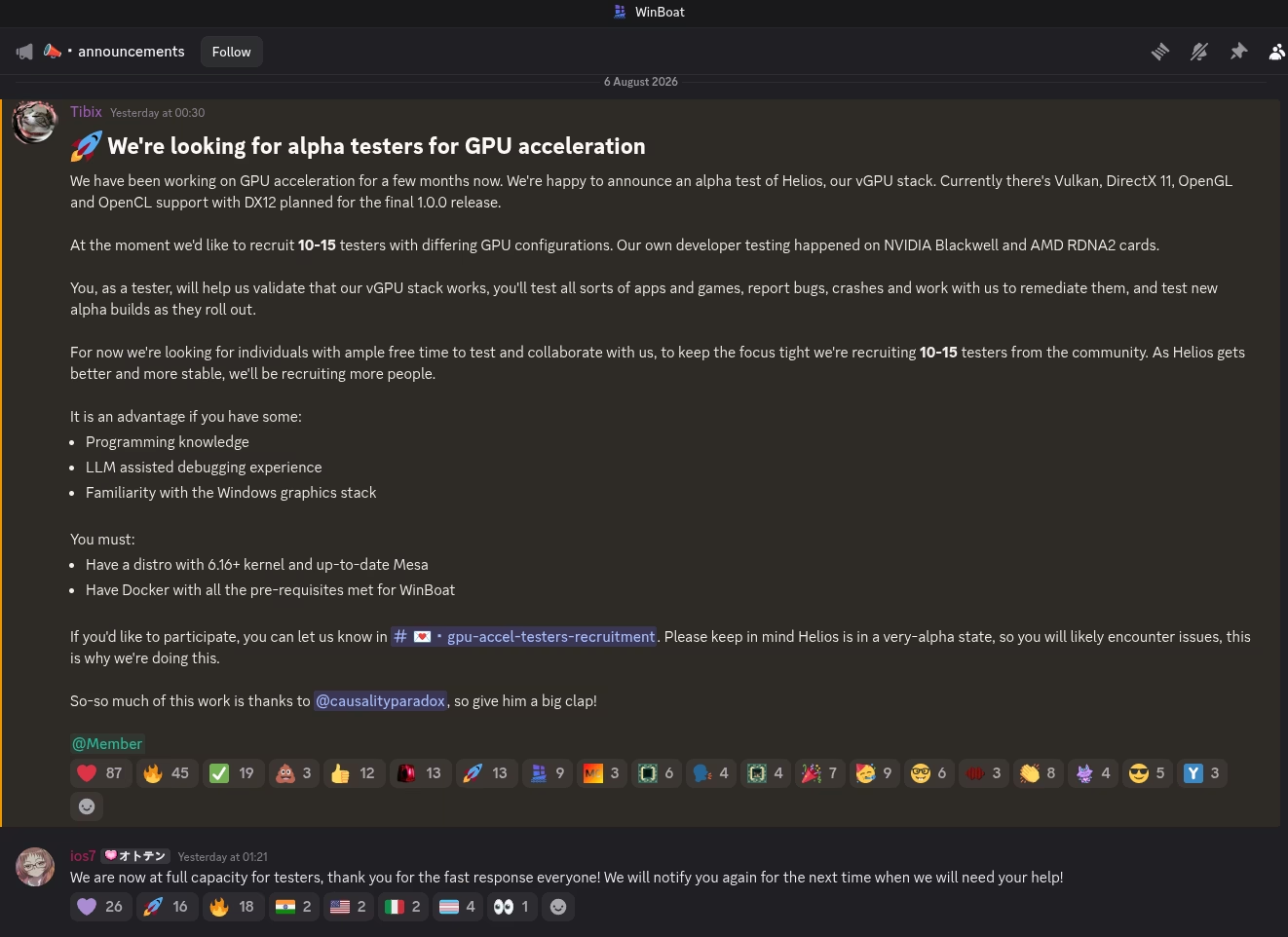
With WinBoat announcing alpha testing for 3D GPU acceleration (massive congrats to rupansh), a lot of people are asking what Helios is and whether they’ll finally be able to remove their Windows partition. Most likely not, it might still be able to run some of your apps. Everything quoted here comes from The main Helios repo (including the comments, they use Claude in their development).
The TLDR version: Helios is API-level paravirtualization, not vGPU in the traditional sense. What it’s doing is effectively shimming the draw calls as they happen on Windows. It installs its own Vulkan driver in the guest, that driver serializes the calls and sends them over a virtio channel to the Linux host, and the host replays them on the real GPU. None of the guest applications see or have access to a GPU directly, meaning any app that is optimized for direct GPU usage will fail (CUDA, NVENC, DXGI, etc).
If that’s what you need, you can stop reading here. API forwarding does not put a real GPU in the guest, what you want is passthrough, which is what we build HardPass for. If you want to know how Helios pulls off the parts it does pull off, keep going.
Lay of the GPU Land
Real GPU drivers implement WDDM, the Windows Display Driver Model. WDDM isn’t “a driver” in the same way a Linux kernel module is. It’s an interface that needs to be implemented or in other words a contract with the OS that has a mandatory minimum: a kernel-mode miniport that dxgkrnl (the graphics kernel subsystem) calls into for memory management, scheduling and display, plus vendor user-mode DLLs that Direct3D loads into every game’s process to turn API calls into hardware commands. Windows owns the GPU as a shared resource, dxgkrnl brokers every process’s access to it, and your driver exists to answer its calls. Only then does your device become a real adapter in Windows’ eyes.
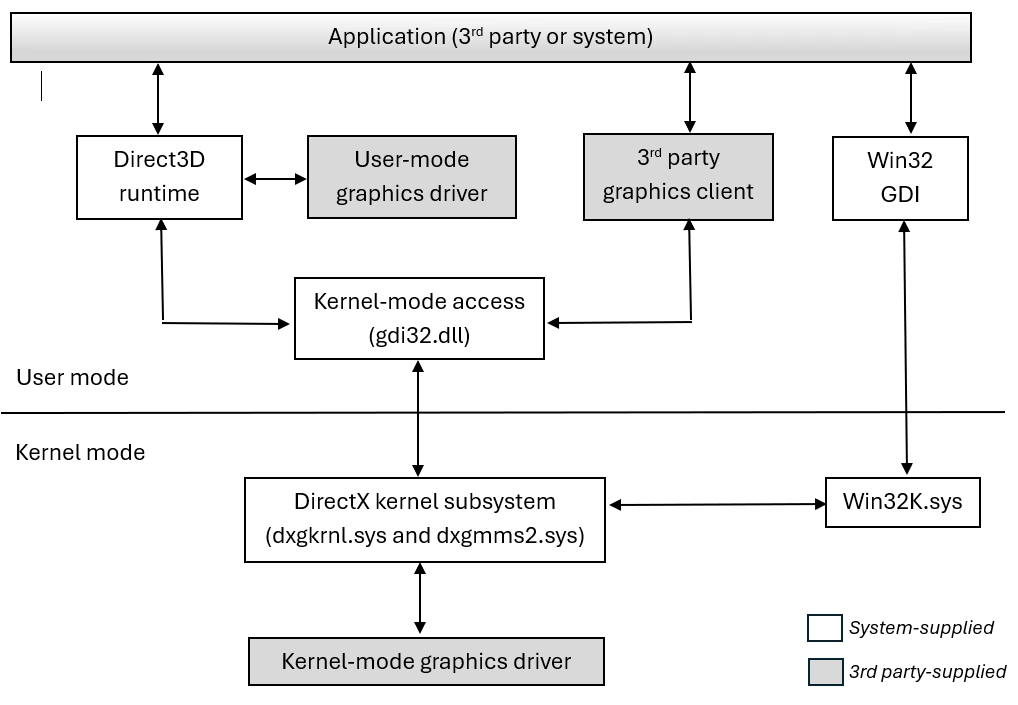 The WDDM stack, from Microsoft’s driver documentation. Gray boxes are what a GPU vendor has to ship.
WDDM takes a lot of time to implement and maintain (given hasn’t stopped the madlads at UTM). Helios doesn’t implement any of it, it’s not a WDDM driver. This is key as it means WinBoat guest machines will NOT have access to your native GPU functionality. So how is it a vGPU at all, you may ask. In the normal sense it isn’t one, it’s API forwarding, and to see how that works we need to talk about virtio.
Talking to the Hardware
Let’s start with something simpler (not really, but it will make more sense later). Network drivers. When QEMU gives a VM a network card, it has two options. It can impersonate a real Intel NIC from 2002 (QEMU’s e1000, an emulated Intel 82540EM), faking every hardware register so the guest’s stock driver is none the wiser, which is slow because every register poke traps out of the VM. Or it can be honest that the hardware is virtual and present a virtio device instead which is a minimal PCI device whose real interface is virtqueues, ring buffers in ordinary shared memory where the guest posts requests and the host posts completions. Just memory both sides can see, plus a single notify register the guest writes to tell the host there’s work in the queue.
Virtio is only a wire protocol, and a wire protocol needs a driver on both ends. Linux ships guest drivers for the whole virtio family in-tree. But Windows has no idea virtio exists, which is why every Windows-on-KVM guide starts with installing Red Hat’s virtio-win drivers including: NetKVM for the network device, viostor for the disk, and so on down the list.
QEMU has the ability to add a virtual GPU similar to the virtual network card called virtio-gpu (PCI\VEN_1AF4&DEV_1050), it allows for two paths in one. The basic path is 2D in which the guest writes pixels into a framebuffer resource and tells the host to put them on screen, no acceleration anywhere. The second is the 3D path (i.e virt-manager’s 3D acceleration checkbox) by which the guest creates a rendering context, allocates memory blobs, and submits opaque command streams, which QEMU hands to virglrenderer on the host to replay on the real GPU, with a fence signaled when the work completes. A Linux guest has had the driver for both paths since 2016, virtio_gpu in the kernel’s DRM subsystem with Mesa sitting on top. On Windows virtio-win’s viogpudo covers only the 2D path, allowing an unaccelerated framebuffer to show a desktop. The closest anyone came was tenclass’s mvisor-win-vgpu-driver, a virgl OpenGL guest driver, but it targets their own mvisor hypervisor and was never part of virtio-win.
That’s the hole Helios fills, its kernel driver is the Windows guest driver for virtio-gpu’s 3D path, the same job virtio_gpu does in a Linux guest (same outcome as when you check OpenGL on your VM). But how they achieve this is different, on Linux, that driver registers with DRM, exposes /dev/dri, and the OS treats the result as a GPU. The Windows equivalent of “register with the graphics subsystem” is implementing WDDM, all of it. Helios decided not to do this. If we take the driver’s INF, the manifest every Windows driver ships that declares what it is (kmd/helios_kmd.inx lines 14-21):
[Version]
Signature   = "$Windows NT$"
Class       = System
ClassGUID   = {4d36e97d-e325-11ce-bfc1-08002be10318}
Provider    = %ProviderName%
CatalogFile = helios_kmd.cat
PnpLockdown = 1
Class = System, not a GPU aka Display. So Windows files it under “System devices” in Device Manager and will never treat it as a GPU. As far as Windows is concerned this machine’s only display adapter is still the software fallback. It does not concern itself with the System device that happens to carry GPU commands.
Eight Verbs and a Syscall
With no WDDM driver there’s no dxgkrnl route into Helios, so it falls back to the plumbing every other non-graphics driver on Windows uses. When the kernel driver loads it creates a device object and publishes it under a named device interface, and that name is the only way in. User-mode code opens it with CreateFile, the same syscall that opens files, and gets back a handle that points at a driver instead of a disk.
Calls on that handle go through DeviceIoControl, and this is what an IOCTL is i.e a syscall carrying a 32-bit control code plus an input and an output buffer, “verb X, here’s my data, give me yours.” The I/O manager packages each call into an IRP (an I/O request packet, the envelope Windows uses for all device I/O) and delivers it to the dispatch routine the driver registered for that device. So tracing the full flow we get named device -> handle -> control code -> IRP -> dispatch routine.
Helios’ entire user-to-kernel API is eight of these verbs, and they map almost one-to-one onto the virtio-gpu 3D operations from the last section: contexts, blobs, command streams, fences (protocol/src/ioctl.rs lines 140-149):
    assert!(IOCTL_HELIOS_CTX_CREATE == 0x0022_E400);
    assert!(IOCTL_HELIOS_CTX_DESTROY == 0x0022_E404);
    assert!(IOCTL_HELIOS_SUBMIT_VENUS == 0x0022_E409);
    assert!(IOCTL_HELIOS_ALLOC_BLOB == 0x0022_E40C);
    assert!(IOCTL_HELIOS_MAP_BLOB == 0x0022_E410);
    assert!(IOCTL_HELIOS_WAIT_FENCE == 0x0022_E414);
    assert!(IOCTL_HELIOS_PRESENT_BLOB == 0x0022_E418);
    assert!(IOCTL_HELIOS_RELEASE_BLOB == 0x0022_E41C);
And that dispatch routine, the place every IRP lands, is a single match on the control code (kmd/src/ioctl.rs lines 82-93):
    let (status, info): (NTSTATUS, usize) = match io_control_code {
        IOCTL_HELIOS_CTX_CREATE => handle_ctx_create(adapter, request),
        IOCTL_HELIOS_CTX_DESTROY => handle_ctx_destroy(adapter, request),
        IOCTL_HELIOS_SUBMIT_VENUS => handle_submit_venus(adapter, request),
        IOCTL_HELIOS_WAIT_FENCE => handle_wait_fence(adapter, request),
        IOCTL_HELIOS_ALLOC_BLOB => handle_alloc_blob(adapter, request),
        IOCTL_HELIOS_MAP_BLOB => handle_map_blob(adapter, request),
        IOCTL_HELIOS_PRESENT_BLOB => handle_present_blob(adapter, request),
        IOCTL_HELIOS_RELEASE_BLOB => handle_release_blob(adapter, request),
        // Unknown control codes are rejected (CLAUDE.md invariant).
        _ => (STATUS_INVALID_DEVICE_REQUEST, 0),
    };
Create a context, destroy it, allocate memory, map it, submit commands, wait for them to finish. Every Vulkan call your game makes gets serialized into an opaque byte stream and pushed through SUBMIT_VENUS. The kernel driver never parses a draw call, they’re just bytes to it.
Don’t tell Raymond
If Windows doesn’t see a GPU, how does a game’s Vulkan runtime find Helios? Through a loophole, Vulkan on Windows doesn’t require the OS to know about your GPU at all. The Vulkan loader finds drivers (called ICDs, installable client drivers) by scanning a registry key, HKLM\SOFTWARE\Khronos\Vulkan\Drivers, where each entry points at a JSON manifest pointing at a DLL. If you’ve heard of SwiftShader and Mesa’s lavapipe, they have enumerated exactly the same way.
And the DLL behind that manifest is Mesa’s Venus driver, the same one ChromeOS and crosvm use for their VMs, ported to Windows with its transport swapped out meaning where a Linux guest talks to the kernel through DRM ioctls on /dev/dri, the Helios port talks DeviceIoControl through those eight verbs. Venus itself is a formal serialization of the Vulkan API, generated from the spec’s machine-readable XML, and the host side decodes it with virglrenderer, maintained by the same people so the encoder and decoder are byte-compatible.
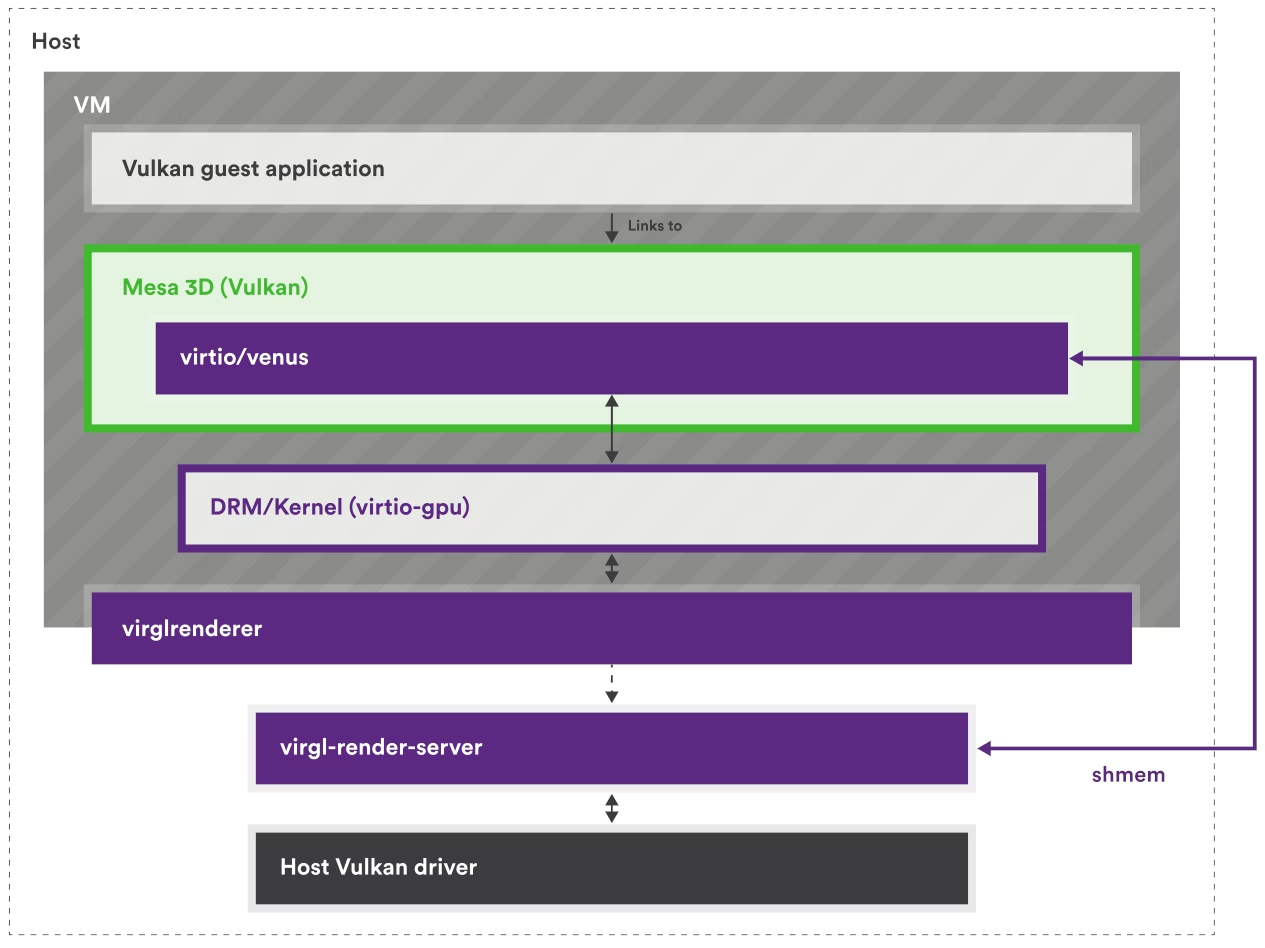 How Venus forwards Vulkan from guest to host, from Collabora’s virglrenderer overview. In Helios the guest side is Windows and the DRM ioctls are replaced by the eight IOCTLs above.
Molasses is not slow?
If you’re thinking “so every vertex buffer gets copied over a pipe, that has to be slow,” it isn’t, because bulk data never crosses the boundary at all, the host GPU memory is mapped straight into the guest. When the game allocates memory (ALLOC_BLOB), the host allocates real GPU memory and exposes its pages through a PCI BAR on the virtio-gpu device (a BAR is a window of device memory the guest can address directly). The kernel driver then wires those pages straight into your game’s address space (MAP_BLOB, kmd/src/ioctl.rs lines 617-634):
    // The (device BAR) pages are inherently locked/non-pageable, and live in I/O
    // space (no PFN-database entry) — both flags are required, see their docs.
    (*mdl).MdlFlags |= MDL_PAGES_LOCKED | MDL_IO_SPACE;
    // The PFN array immediately follows the MDL header.
    let pfns = (mdl as *mut u8).add(size_of::<MDL>()) as *mut u64;
    let pages = (size >> PAGE_SHIFT) as usize;
    let pfn0 = gpa >> PAGE_SHIFT;
    for i in 0..pages {
        // SAFETY: `pfns[0..pages]` is the freshly-allocated PFN array sized for
        // `pages` entries by IoAllocateMdl.
        *pfns.add(i) = pfn0 + i as u64;
    }
    let priority = NORMAL_PAGE_PRIORITY | MDL_MAPPING_NO_EXECUTE;
    // SAFETY: `mdl` is a valid, populated, locked MDL; maps into the current
    // (user) process. BugCheckOnFailure = FALSE (ignored for UserMode — see the
    // exception note above).
    let va =
        MmMapLockedPagesSpecifyCache(mdl, USER_MODE, cache, core::ptr::null_mut(), 0, priority);
An MDL is Windows’ structure for describing physical memory pages. This code hand-builds one over the device window’s page frame numbers and maps it into the calling process. When your game writes a vertex buffer, it’s writing directly into memory the host GPU reads.
On top of this, Vulkan is a record-then-submit API, meaning you record a whole frame of work into command buffers, then hand everything over in one vkQueueSubmit. So the pipe carries a few big batches per frame instead of thousands of chatty calls. It’s also why the same idea applied to classic OpenGL (the older virgl project) performs as badly as it does, and why Helios forwards only Vulkan.
On the wire, a SUBMIT_VENUS call becomes the standard virtio-gpu SUBMIT_3D command with a fence attached, a fence being just a number the host echoes back when the work is done (kmd/src/virtio/gpu.rs lines 933-937):
        let mut cmd = VirtioGpuCmdSubmit::zeroed();
        cmd.hdr.type_ = VIRTIO_GPU_CMD_SUBMIT_3D;
        cmd.hdr.flags = VIRTIO_GPU_FLAG_FENCE;
        cmd.hdr.fence_id = fence_id;
        cmd.hdr.ctx_id = ctx_id;
The host renders, completion comes back through a virtio interrupt, the driver wakes whoever was blocked in WAIT_FENCE, and the finished pixels land right back in that shared BAR memory. So we covered the datapath to the GPU, but how do we see it now?
Grant me sight
There’s no display verb in the eight, the closest thing, PRESENT_BLOB, is a leftover from an abandoned display experiment that the repo’s own comments call a throwaway. A System-class device gives Windows no monitor to output to, so WinBoat bolts on a second stack that shares no code with Helios: Looking Glass, specifically gnif’s IDD.
An IDD, indirect display driver, is Microsoft’s framework for monitors that don’t physically exist, the same mechanism behind virtual-monitor and wireless-display apps. It’s the one piece of the display world you can build without implementing WDDM, the driver tells Windows “a monitor is attached, here are its modes,” and Windows delivers it finished desktop frames. Those frames still come from software compositing on Microsoft’s basic render fallback, because Windows still doesn’t believe it has a GPU. Helios can only accelerate apps whose calls happen through Vulkan (natively or via the translation layers) and don’t demand a real vendor GPU or its capabilities first. Everything else still runs, just on the software renderer unaccelerated.
The full round trip for one frame of your game thus becomes: Vulkan calls cross into the host over virtio-gpu, the real GPU renders, the finished image lands in shared BAR memory, the guest composites it into its desktop, and the Looking Glass IDD ships that composited frame back over ivshmem to your actual screen. Commands go one way over one PCI device, frames come back over ivshmem. As a result there’s always a composite-and-copy hop which will cause latency.
“But It Says DirectX and OpenGL Support”
It does, and it’s true from a user’s POV, but architecturally everything is still that one Vulkan pipe. The announcement’s API list is translation layers stacked in the guest: DXVK turns Direct3D 8 through 11 into Vulkan, Zink turns OpenGL into Vulkan, and OpenCL would ride an OpenCL-on-Vulkan layer (clvk, or Mesa’s rusticl over Zink). The Helios Mesa build doesn’t even compile an OpenGL driver, the build config in the repo explicitly passes (icd/win-build/README.md lines 31-32):
"-Dvulkan-layers=","-Degl=disabled","-Dgbm=disabled","-Dglx=disabled","-Dopengl=false",
This also explains why DX12 is “planned” rather than shipped. vkd3d-proton, the D3D12-to-Vulkan layer, leans much harder on looking like a real Windows GPU, with DXGI adapter enumeration and WDDM interop, and that is exactly what a Class = System device structurally is not.
Ctrl+F section
Does Helios give my Windows VM CUDA or NVENC? No. Both hang off a vendor driver stack that never loads in the guest, and nothing in the Vulkan pipe substitutes for it. The same goes for anything that enumerates adapters through DXGI.
Does it support DirectX 12? Not in the alpha. DirectX 11 and below work through DXVK. DX12 needs vkd3d-proton, which expects a real adapter to enumerate against, so a Vulkan pipe alone doesn’t get you there.
Is this the same thing as GPU passthrough? No. Passthrough hands the guest the physical device, so the vendor driver loads and everything works, at the cost of that GPU being unavailable to the host while the VM owns it. Helios shares one host GPU between host and guest, and pays for that in capability and latency.
Is it just the 3D acceleration checkbox in virt-manager? Same transport and outcome but different protocol. That checkbox gives a Linux guest virgl, the OpenGL path. Helios carries Venus, the Vulkan path, which needs virglrenderer 1.0 or newer, QEMU with venus=on, blob resources and CONFIG_UDMABUF on the host. The pipe has existed for years yes, but what Helios adds is the Windows guest driver that was missing.
Will my games run? Anything that reaches Vulkan will, natively or through DXVK. How well it runs depends on how much of your frame time goes to round trips and that one composite-and-copy hop.
Fix you say, but for whom?
That’s what Helios is: not a virtual GPU like many assume, it’s a pipe to the real GPU on the host. For browsers, desktop apps, older games and general “I want Windows apps to feel better than RDP” it’s a good fit.
And if your workload lands on the wrong side of that list, if you need CUDA, vendor-locked pro software, or every last frame with none of the latency tax, the answer in 2026 is still passthrough. If you want passthrough in less than 10 minutes, check out HardPass.
Share this post
Related Posts
The Pain Behind EA Games: EA Javelin
With the new BF6 trailer dropping, there has been a new wave of players interested in running EA …
Understanding RDTSC Timing Checks: The Technical Reality of VM Gaming
My goal for these posts are simple: people should be able to enjoy the games they legitimately own …